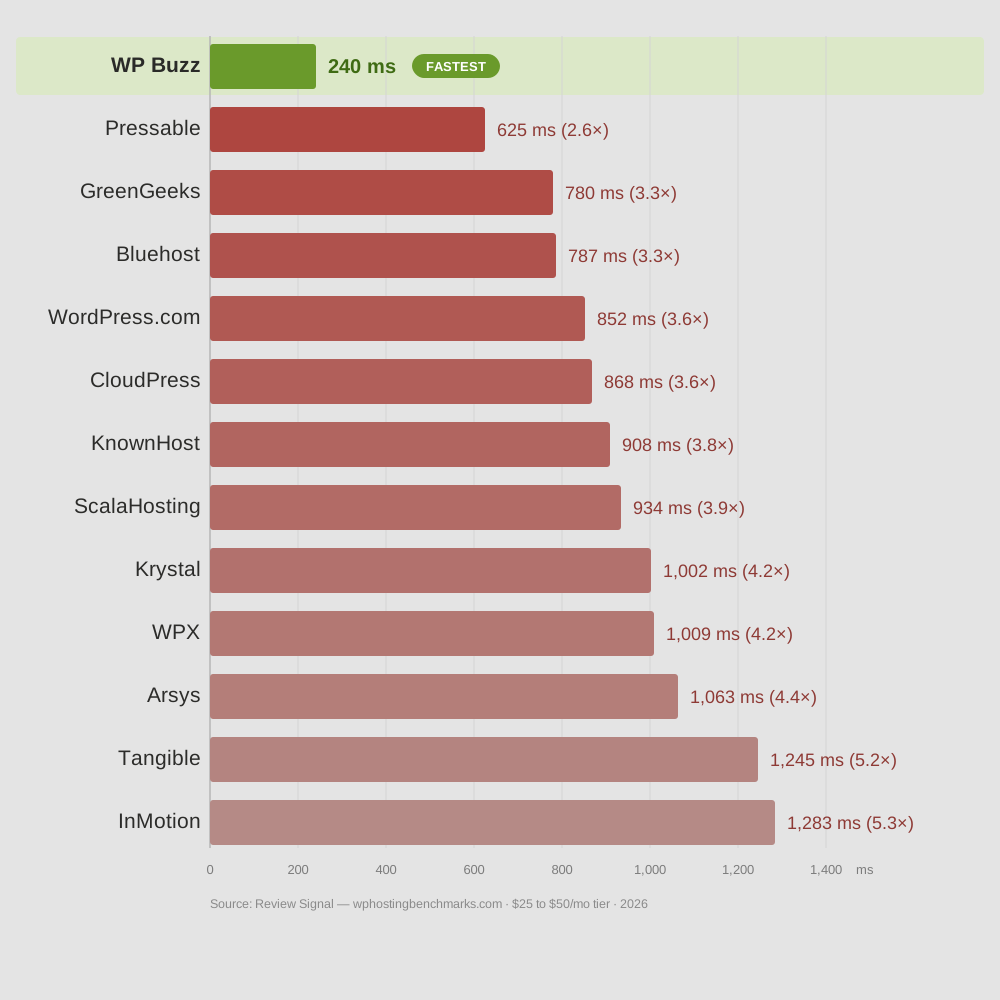
We run Ryzen 9950X processors at WP Buzz. In 2026, Review Signal independently benchmarked over 40 WordPress hosts under identical test conditions. Our setup posted the fastest worldwide load times at every price tier. Average response time was 6.9 – 8.7 milliseconds.
I’m not writing this to sell you on us. I’m writing it because a lot of hosts now advertise the 9950X, and most of them are doing the bare minimum with it. If you’re shopping for 9950X hosting, here’s what actually matters and what to watch out for.
Why This Chip Specifically
WordPress is single-threaded. It handles one task at a time on one CPU core. So the speed of that one core is what determines how fast your pages get built.
The 9950X boosts to 5.7 GHz. That’s the highest clock speed you can buy right now. Most hosting providers run Intel Xeon or AMD EPYC chips that sit between 3.0 and 4.0 GHz. Those chips have more cores, which helps software that can use them all at once. WordPress can’t. It uses one core per request.
So a 5.7 GHz chip will generate a WordPress page faster than a 3.5 GHz chip. That’s not an opinion, that’s how single-threaded software works.
The Chip Alone Means Nothing
I’ve seen hosts slap a 9950X label on their marketing page and pair it with Gen 3 NVMe drives and DDR4 RAM. That’s a 5.7 GHz processor spending half its time waiting for data from storage and memory that can’t feed it fast enough.
Gen 5 NVMe drives read at 13,000 MB/s. Gen 3 does about 3,500 MB/s. If a host doesn’t tell you which generation their storage is, assume it’s not Gen 5.
Same story with RAM. DDR5 delivers roughly double the bandwidth of DDR4. When traffic spikes and the processor needs data fast, DDR4 creates a queue. Your visitors feel that queue as slower page loads.
Then there’s the web server. Apache is slow, everyone knows that. Nginx is better but it still relies on third-party caching plugins that weren’t designed for it. LiteSpeed Enterprise is built for speed and has its own native cache layer. It also costs money per server, which is why budget hosts don’t use it.
If you’re evaluating a host, ask them four things: what generation is your NVMe, what generation is your RAM, what web server do you run, and is your caching native or third-party. If they dodge any of those, the 9950X on their website is a sticker, not a strategy.
What We Actually Run and Why
Our stack at WP Buzz is Ryzen 9950X at 5.7 GHz, Gen 5 NVMe, DDR5 RAM, LiteSpeed Enterprise with LiteSpeed Cache, and Redis for database caching. CDN is natively integrated with QUIC.cloud and Cloudflare.
I won’t pretend we stumbled onto this combination. We spent years tuning it. PHP workers, cache rules, database settings, kernel-level configuration. The same hardware can run fast or sluggish depending on who sets it up. We’ve gone through enough iterations to know what works.
The reason all of this matters as a system is cache purging. Most hosts use a web server from one vendor, a caching plugin from another, and a CDN from a third. These tools don’t talk to each other properly. You update a page and the cached version hangs around for minutes or hours. Or the cache plugin conflicts with another plugin and you spend an evening debugging.
When the web server, cache, and CDN are all from the same ecosystem, cache purges happen in milliseconds. No conflicts. No debugging. You hit publish and the live site updates instantly.
The Part Most Speed Tests Don’t Show
Most hosting reviews test cached performance. They load a static page that’s already been generated and stored. That test matters, but it only covers the easy case.
The harder case is uncached performance. A page that has to be built from scratch on every request. WooCommerce carts. Checkout pages. Search results. Membership dashboards. LMS course pages. Quiz results. Anything that’s different for every visitor.
These pages hit the processor directly every time. No cache to hide behind. And this is exactly where the 9950X at 5.7 GHz with fast storage and Redis makes the biggest difference. Our PHP compute times in the 2026 benchmarks were among the fastest across all hosts tested. That’s the raw measurement of how quickly the processor runs WordPress code.
If you run any kind of dynamic site, ask the host what their uncached performance looks like. Most won’t have an answer.
Isolation
Your site should run in its own container. Completely separated from other users. If someone else on the same server gets hacked or runs a badly coded plugin that eats CPU, your site shouldn’t notice.
Not every host does this. Shared hosting typically puts hundreds of sites in the same environment. Ask.
We also run WordPress, email, DNS, and backups on separate infrastructure. If the email system has a hiccup, your website doesn’t care. These are boring architectural decisions but they’re the reason things stay running when something goes wrong.
Location and CDN
Our servers sit in Ashburn, Virginia. It’s one of the largest internet hubs in the world. Same facilities used by Amazon and Google.
For visitors outside the US, the CDN handles it. Your site gets cached at edge locations globally. Someone in London gets served from London. Someone in Tokyo gets served from Tokyo.
In the benchmarks, our setup wasn’t just fastest from US test locations. It was fastest from test locations worldwide. That’s the combination of fast origin hardware and proper CDN integration doing its job.
Pricing
Plans start at $15 per month. That includes the 9950X hardware, Gen 5 NVMe, DDR5, LiteSpeed Enterprise, Redis, CDN integration, email hosting, and free migrations.
I mention this because I know what other hosts charge for slower setups. Some charge $30 or $50 per month on lower-clocked processors with Gen 3 storage, then sell you Redis and CDN as add-ons. You end up paying more for less.
A properly built stack doesn’t need bolt-on fixes. It just works from the start, which keeps the cost down.
What I’d Tell a Friend
If someone asked me what to look for in 9950X WordPress hosting, I’d say ignore the chip name on the marketing page. Ask what’s around it. Storage generation, RAM generation, web server, caching architecture. Ask if they have independent benchmark results or if they’re just quoting their own internal tests.
Over 40 hosts were tested independently in 2026. The data is public. Anyone can look at it. The hosts who performed well will point you to it. The ones who didn’t will talk about something else.